
Create white-label, AI powered auto proctored exams in seconds
Pairs perfectly with Thinkific, Teachable, Kajabi, and any platform missing real exam tools.
Student Login
Enter your credentials to join. No account required.
Built for Educators, by Educators.All in One tool, at a fraction of the cost!
From creation to results — ExamsPro.ai handles the complexity so you can focus on teaching.
Generate an entire exam in seconds
Stop spending hours writing questions manually. Describe your topic, paste a PDF, or upload lecture notes — ExamsPro.ai's AI instantly generates a full question bank with correct answers, distractors, and marks. Pick your model, language, difficulty, and count, then add custom instructions for fully tailored questions.
- Four question types: Multiple Choice, True/False, Short Answer, and File Upload
- Generate up to 300 questions in a single run
- 17 languages including Sinhala, Tamil, Hindi, Arabic and more
- Choose difficulty: Easy, Medium, Hard, or Mixed
- Select from multiple AI models with per-question credit tracking
- Add custom instructions to tailor tone, style, and scenarios
- Edit, reorder, or regenerate any question before publishing
1. Which organelle is known as the powerhouse of the cell?
A. Nucleus ●B. Mitochondria C. Ribosome D. Vacuole
2. What is the primary function of the cell membrane?
A. Protein synthesis B. Energy production ●C. Selective permeability D. DNA storage
3. Which process converts glucose into ATP?
●A. Cellular respiration B. Photosynthesis C. Osmosis D. Diffusion
Integrity Report
Automated analysis of suspicious activity
James L.
j.lee@uni.edu
Aisha M.
a.malik@uni.edu
Sarah K.
sarah.k@uni.edu
Maria G.
m.garcia@uni.edu
Event Timeline — James L.
Catch cheating before it becomes a problem
ExamsPro.ai's automated integrity system runs silently in the background, capturing periodic webcam snapshots and logging suspicious behavior — so you don't have to watch every screen yourself.
- Periodic photo snapshots during the exam
- Tab-switch and window-blur detection
- Automatic suspicious activity flagging
- Full photo log per student for review
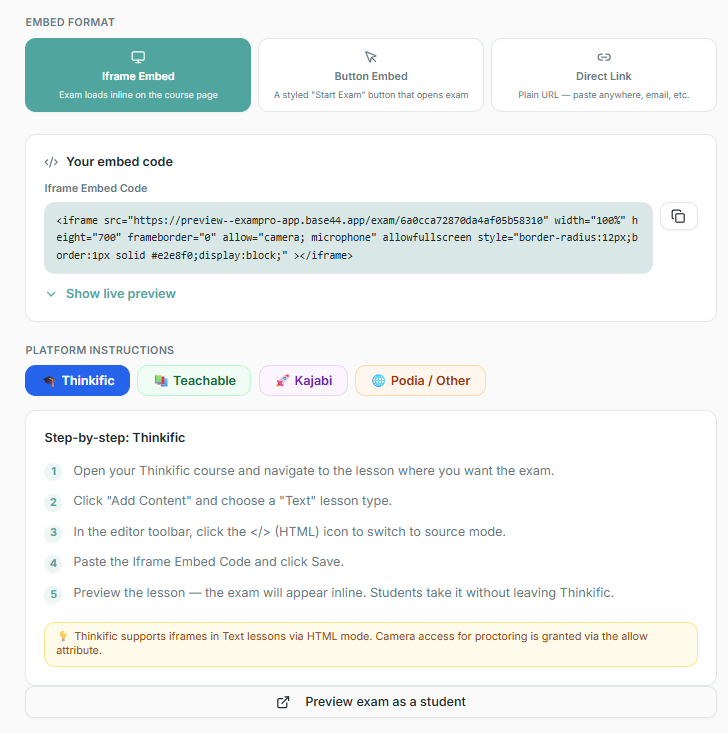
Embed exams directly into your course in seconds
Zero coding required. Copy an embed code from ExamsPro.ai and paste it into Thinkific, Teachable, Kajabi, Moodle, or any platform with HTML support. Your branded exam loads seamlessly inside your lesson — students never leave your course.
- Responsive iframe embed — works on desktop, tablet, and mobile
- Customizable button embed with your exam title and branding
- Direct shareable link for emails, syllabi, and external sites
- One-click setup — no technical knowledge needed
- Pre-built integrations for Thinkific, Teachable, Kajabi, and more
In one word, what comes to mind when you hear "cell biology"?
27 responses
Real-time audience polling and instant results
Engage your class with live interactive quizzes. Ask questions, see responses stream in real-time, and display results instantly on the big screen. Students use any device — phone, tablet, or laptop.
- Multiple question types: MCQ, polls, word clouds, emoji feedback, star ratings
- Real-time response collection and live leaderboard display
- Auto-advance or manual control between questions
- Custom branding on all student-facing screens
- Download professional PowerPoint results with charts & analytics
- One-click session sharing via QR code or unique code
Verify attendance with unique codes, photo capture and GPS tracking
Run attendance sessions alongside or independent of exams. Students join with a session code, receive a unique confirmation code, verify with a webcam snapshot, and their device GPS location is captured — no more buddy-signing, remote proxying or manual roll calls.
- Preloaded rosters or open guest mode
- Auto-generated unique codes per student
- Webcam photo capture for verification
- GPS location capture with a live check-in map
- Scheduled link availability by day and time
- Real-time roster of who has checked in

Sarah Kim
sarah.k@uni.edu | #S001
Jul 21, 2:15 PM | Code: 7F2A
6.9271, 79.8612

James Lee
j.lee@uni.edu | #S002
Jul 21, 2:15 PM | Code: 3B91
6.9271, 79.8612

Tom Brown
t.brown@uni.edu | #S004
Jul 21, 2:15 PM | Code: C5D0
Aisha Malik
a.malik@uni.edu | #S005
Jul 21, 2:15 PM | Code: —
Issue branded certificates and letters in one click
Generate verifiable PDF certificates and confirmation letters for every student — fully branded with your logo, signatures, colours and custom body text. Each certificate carries a unique serial number linked to a public verification page.
- Custom certificate & letter titles, body text and signatures
- Upload your logo, background and up to 3 signature images
- Landscape or portrait A4 with custom border and font
- Unique serial numbers with a public verification page
- Auto-email certificates and letters to students on issue
- One-click download or bulk issue to a whole student list
UNIVERSITY OF OXFORD
Certificate of Achievement
This is proudly presented to
Sarah Kim
For successful completion of the Leadership Programme 2026
Dr. A. Reed
Programme Director
EPA-20260721-004813
Prof. M. Khan
Dean
University of Oxford
Academic Transcript · Leadership Programme 2026
Student: Sarah Kim
Index: S2024001
Build professional academic transcripts
Combine exam attempts, attendance and manual scores into weighted GPA transcripts. Customise the grading scale, letter body, signatures and branding — then export a polished A4 portrait PDF per student.
- Weighted subjects with assessments and direct marks
- Customisable GPA scale and grade points
- Auto-calculated overall GPA and average
- Branded letter body with placeholders and up to 3 signatures
- Custom institute name, logo, accent colour and font
- A4 portrait PDF, one per student or in bulk
Likely human-written. Minor AI-assisted phrasing detected in intro.
Strong sources, well-cited.
Good insight; deeper depth possible.
Clear, well-organised.
Minor formatting issues.
AI content check and auto-marking against your rubric
Students upload their assignment file, and ExamsPro.ai's AI first scans it for AI-generated content, then automatically reads the submission and marks each rubric criterion with marks and comments. You review, adjust, and finalize. Cut marking time from hours to minutes.
- AI content check — flags AI-generated text with a probability score
- Automatic rubric marking — each criterion graded instantly
- Editable AI marks with instructor comments before finalizing
- Supports PDF, DOCX, and image uploads
- Full workflow: pending → AI graded → finalized
See results the moment students submit
No more waiting to mark papers. ExamsPro.ai auto-grades objective questions instantly and surfaces class-wide insights — average score, pass rate, hardest questions — all in real time.
- Instant auto-grading for MCQ & True/False
- Live dashboard with per-student scores
- Identify which questions students struggled with
- Export results to CSV in one click
Sarah Kim
sarah.k@uni.edu
James Lee
j.lee@uni.edu
Maria Garcia
m.garcia@uni.edu
Tom Brown
t.brown@uni.edu
Aisha Malik
a.malik@uni.edu
Manage dozens of tests in one click
Running a whole semester of exams? Select any number of tests and archive, delete, or duplicate them all at once. Keep your workspace organised with zero administrative overhead.
- Select all or cherry-pick individual tests
- Bulk archive to de-clutter your dashboard
- Bulk delete with a single confirmation
- Duplicate tests to reuse question banks instantly
Shareable Exam Link
Institution Logo
Banner Image
Exam Page Colors
Font Family
Live Exam Header Colors
ProCustom Footer Text
ProYour exam, your brand
Students see your institution's name, logo, and banner — not ExamsPro.ai's. Upload a logo and banner, set page and button colors, choose a font, write instructions, and share a branded link you can embed in any LMS.
- Shareable, embeddable exam link
- Upload institution logo and banner image
- Custom page background, text, and button colors
- Choose from 10 font families
- Custom exam instructions and passing percentage
- Live exam header colors and custom footer (Pro)
Enroll students from a list, file, or one by one
Link a saved Student List and import all members in one click, upload CSV, XLSX, or JSON files, paste a list directly into the text box, or add students individually. Every enrollment is tracked by name, email, and student ID.
- Link a saved Student List and import all members in one click
- Upload CSV, XLSX, or JSON files to bulk enroll
- Paste a list (Name, Email, StudentID) directly into the text box
- Download a ready-made import template
- Add students one by one with name, email & student ID
Linked Student List
Bulk Add — one per line: Name, Email, StudentID
James Lee, j.lee@uni.edu, S2024002
24 Students Enrolled
Every student gets a unique exam
Side-by-side cheating becomes impossible. ExamsPro.ai shuffles question order and answer options independently for every student — same content, completely different layout. Pair it with webcam proctoring for watertight integrity.
- Shuffle question order per student
- Shuffle answer choices independently
- Randomly select a subset from a larger question pool
- Combined with proctoring for maximum integrity
Shuffle Questions
Randomize question order for each student
Shuffle Answer Options
Randomize MCQ answer order for each student
Question Selection
Choose how many questions students receive
Number of questions to select
🔀 Result: 24 unique exam versions generated
No two students will see the same question or answer order
S001 · Biology Midterm
Sarah Kim
S004 · Biology Midterm
Tom Brown
Reports ready the instant the exam ends
No manual marking. No spreadsheet fiddling. The moment your last student submits, ExamsPro.ai has a full class report and individual PDF result cards ready to download and share.
- Export full class results to CSV in one click
- Generate individual student result PDFs
- Scores, grades, answers & pass/fail status included
- Share results with students or department heads instantly
Students can sit exams from anywhere
No app to install. No complicated setup. Students open a link, enter their room code, and they're in — on any phone, tablet, or laptop. The exam experience is clean, distraction-free, and works on every modern browser.
- Works on mobile, tablet & desktop browsers
- No account or app install required for students
- Clean, focused exam interface — no distractions
- Live countdown timer visible throughout
8. What is the role of ATP synthase in cellular respiration?
Give students a second chance with controlled retakes
Configure retake limits, cooldown periods, and specific availability slots. Students can attempt exams multiple times within your rules — track each attempt separately with full integrity monitoring.
- Set retake limits (1–3 attempts)
- Enforce cooldown periods between retakes
- Schedule specific retake windows
- View and compare all student attempts
Number of Retakes Allowed
Set to 0 to disable retakes
Retake Availability
Cooldown Period (hours)
Step 1: Add Students
2 valid students ready
Step 2: Select Tests
Select AllBiology Midterm
Room: BIO101 · Course: BIO-101
Chemistry Quiz 3
Room: CHM03 · Course: CHEM-201
Physics Final
Room: PHYFIN · Course: PHY-301
2 tests selected
This will create 4 enrollments.
Assign StudentsAssign the same students to multiple exams at once
Running an entire semester of exams? Select multiple tests and bulk-assign all your students to them in one operation. No manual enrollment needed — paste, select, and go.
- Select multiple tests in one go
- Paste student list or import CSV
- Assign entire class in seconds
- Avoid duplicate enrollments automatically
Build a reusable question library
Save your best questions to a persistent bank. Tag them by subject, difficulty, and topic. Reuse questions across multiple exams, generate AI variations, and organise your entire curriculum in one place.
- Save and organise questions by subject & tags
- Import AI-generated variations instantly
- Bulk add questions to new exams
- Full-text search across your question library
- Track which exams use each question
Question Bank
24 saved questions
Subjects
Tags
What is photosynthesis?
The nucleus contains DNA.
Explain osmosis in one sentence.
Exam Availability Window
Set when students can join and when the exam auto-closes. The exam must be in Active status for students to join.
Timezone
All times below are interpreted in this timezone.
Opens At (students can join from this time)
Closes At (no new submissions after this time)
Current Schedule (Asia/Colombo)
Opens: Jun 10, 2026, 9:00 AM
Closes: Jun 10, 2026, 11:30 AM
Set it and forget it — exams run themselves
Define an open and close window for your exam. Students are automatically locked out before it starts and after it ends — no manual intervention needed, even if you're asleep.
- Precise open/close date & time
- Students see a live countdown before opening
- Late submissions automatically blocked
- Works across all time zones
Using any LMS or learning platform?
Most platforms are great for delivering course content — but they lack real exam tools. No timed tests. No proctoring. No randomised questions. ExamsPro.ai fills that gap perfectly with seamless integration.
Build your exam in ExamsPro.ai
Create a timed, proctored exam with AI-generated questions. Set an open/close window so it runs automatically.
Share a link inside your LMS
Paste the exam link into your LMS lesson (Moodle, Thinkific, Teachable, Kajabi, etc.). Students click it and go straight to the exam — no account needed.
Download results & upload grades
Export the full class CSV the moment the exam closes. Upload it to your LMS gradebook in seconds.
Simple, Transparent Pricing
Start free for 7 days. No credit card required.
- 7-day free trial
- Up to 10 students per test
- Basic question types
- AI question generation
- AI question generation from PDF
- Webcam proctoring
- Bulk test management
- Custom branding
- Up to 100 students per test
- AI Question generation
- 50 AI credits per month
- AI question generation from PDF
- Webcam proctoring
- Bulk test management
- Custom branding uploads
- CSV exports & reports
- Priority support
- Unlimited students per test
- Unlimited live quiz participants
- 150 AI credits per month
- AI question generation & PDF import
- Webcam proctoring + integrity reports
- Assignment grading with AI rubric marking
- Custom branding (logo, colors, header & footer)
- Question & answer shuffling
- Retake scheduling (cooldown or specific times)
- Student lists with custom fields & rosters
- Advanced analytics & CSV export
- Priority support
All plans include core exam features. Pricing in USD. Cancel anytime.
Start Running Better Exams Today
7-day free trial. No credit card required. Set up your first exam in under 5 minutes.